
VIP Room Owners: Your Power Zone on Diamond Secrets
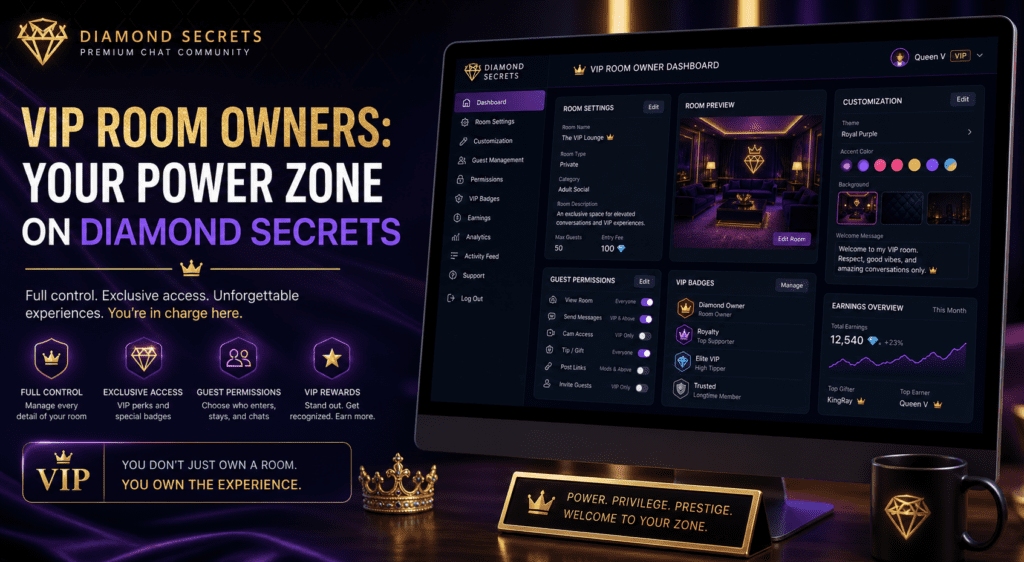
VIP room owners on Diamond Secrets have more control, more visibility, and more ways to shape the user experience. In this guide, you’ll learn how to create a VIP room, customize your settings, and use your room management tools to stand out.
VIP room owners on Diamond Secrets have more control, more visibility, and more ways to shape the user experience. In this guide, you’ll learn how to create a VIP room, customize your settings, and use your room management tools to stand out.
If you want to understand the wider platform first, it helps to review the Getting Started with Diamond Secrets Chat guide and the VIP Features Explained page before setting up your space.
What VIP Room Owners Can Do
On Diamond Secrets, VIP-level features are designed to give you more control, more visibility, and more fun with minimal friction. For VIP room owners, that means you can create your own public or private rooms, set names and descriptions, and customize the look and feel of your space.
VIP room owners can also use exclusive styling options and features described in the VIP Features Explained section. That makes it easier to build a branded room that feels distinct from the rest of the platform.
How to Open Your Room Options
If you are already in your own VIP room, opening the room-management panel is simple. While in your room, click your profile image or avatar in the top-right corner, then select Room Options or Room Settings from the dropdown menu.
That takes you directly into the room-control panel, where you can adjust visuals, permissions, and behavior. If you are a guest, you will not see these options, since only the VIP room owner can access them.
Creating Your First VIP Room
To create your first room, go to the Rooms or Create Room section in your VIP dashboard. From there, choose whether the room should be public or private, then fill in the room name, description, and category tags.
For best results, keep your room naming clear and easy to remember. A short description helps visitors know what to expect, and a well-chosen category can improve discoverability within the site. For a better understanding of how the platform is organized, you can also read the Welcome To Diamond Chat: A Quick-Start Guide.
Room Settings and Customization
Once your room is live, the Room Options panel lets you fine-tune the experience. Common settings may include room visibility, access rules, moderation tools, permissions, and sound or typing indicator preferences.
If your setup supports custom branding, use it to create a consistent room identity. A strong theme, matching colors, and clear room rules can make your room easier to recognize and more inviting for returning guests.
Managing Guests and VIP-Only Zones
VIP room owners can create more exclusive experiences by controlling access inside their rooms. That may include VIP-only rooms, invite-only spaces, or premium access zones that keep the room focused on the right audience.
This can be especially useful if you want a quieter, more engaged crowd. It also gives you more control over the tone of the room and the type of interaction you want to encourage.
VIP Features That Make Your Room Pop
Beyond room creation, VIP features can help your room stand out and stay active. Custom text colors, stronger visibility, faster gold earning, and premium-style tools can all make the room feel more polished and engaging.
You can also use these features strategically to promote events, reward active members, and build a stronger sense of community. For more details on these benefits, review the VIP Features Explained page before deciding how to structure your room.
Tips for VIP Room Owners
A few simple habits can make a big difference:
- Use a consistent theme so visitors remember your room.
- Keep your room description clear and specific.
- Be active as the host and respond regularly.
- Set clear expectations in the room rules.
- Cross-promote with other VIP members when appropriate.
For community standards and responsible room management, it is also smart to read the Diamond Secrets Rules before promoting or moderating your room. If you want additional formatting and SEO guidance, Google’s SEO Starter Guide and link best practices are useful references.
FAQ
How do VIP room owners on Diamond Secrets create a room?
Go to the Rooms or Create Room section in your VIP dashboard, choose your room type, and enter the room details.
Can VIP room owners customize their room?
Yes. VIP room owners can typically adjust room name, description, visibility, permissions, and other settings.

PhoenixJenn (aka Symphony) is the founder of Diamond Secrets — the 18+ chat community she built from scratch because the internet needed a place that actually felt worth staying in. Part platform builder, part community guardian, part music obsessive, she handles everything from tech and design to cyber safety and community culture, which means no two days look the same.
She’s been building online communities for years and genuinely cares about getting it right — which is why Diamond Secrets keeps growing while other chat sites quietly fade away. Safety is baked in from the start here, not bolted on as an afterthought, and the warm atmosphere isn’t an accident either. That’s all her.
If Diamond Secrets feels like a hidden gem worth telling your friends about, that’s entirely on purpose.